Analyse Airline
Schedules
Turn SSIM7 schedule data into useful information.
Analyse airline schedule files and quickly produce statistics, reports and operational information from your SSIM7 data.
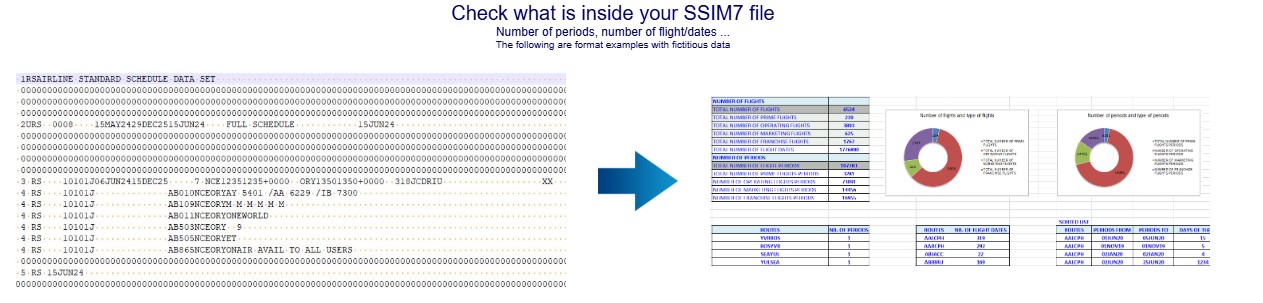
Analyse your airline schedules
ANALYSE processes SSIM7 schedule files and turns the information contained in them into useful statistics and operational data.
- ✔ Schedule statistics
- ✔ Flight information
- ✔ Period and date information
- ✔ Operational data
- ✔ Excel reports
Quickly understand your schedule
Get a clearer view of the information contained in your SSIM7 file, including flights, periods, dates and other schedule data.
- ✔ Number of flights
- ✔ Number of flight dates
- ✔ Number of operating periods
- ✔ Schedule information
Create useful reports
ANALYSE presents schedule information in a structured format, making it easier to review airline operations and work with the resulting data.
- ✔ Structured schedule information
- ✔ Operational summaries
- ✔ Flight data
- ✔ Excel-compatible reports


See the information that matters
ANALYSE helps transform complex SSIM7 schedule data into information that is easier to review and understand.
- ✔ Airlines and routes
- ✔ Flight numbers
- ✔ Aircraft information
- ✔ Operating dates
- ✔ Days of operation
How It Works
Analysing an SSIM7 schedule is simple.
01. Select
Select the SSIM7 schedule file that you want to analyse.
02. Analyse
ANALYSE processes the schedule and extracts the relevant flight and operational data.
03. Report
Review the resulting statistics and reports to better understand your airline schedule.
Ready to analyse your schedules?
Download the free SSIM7 utilities and turn your airline schedule data into useful information.
Download ANALYSE